 Sapere.
Sapere.
Sapere.
iOS companion app In testing
Studio reads your own intervals.icu data and makes the call a coach would: go, ease off, or rest. Every number explains itself, and your own sense of the day adjusts the call.
In testing on iOS · free to start.
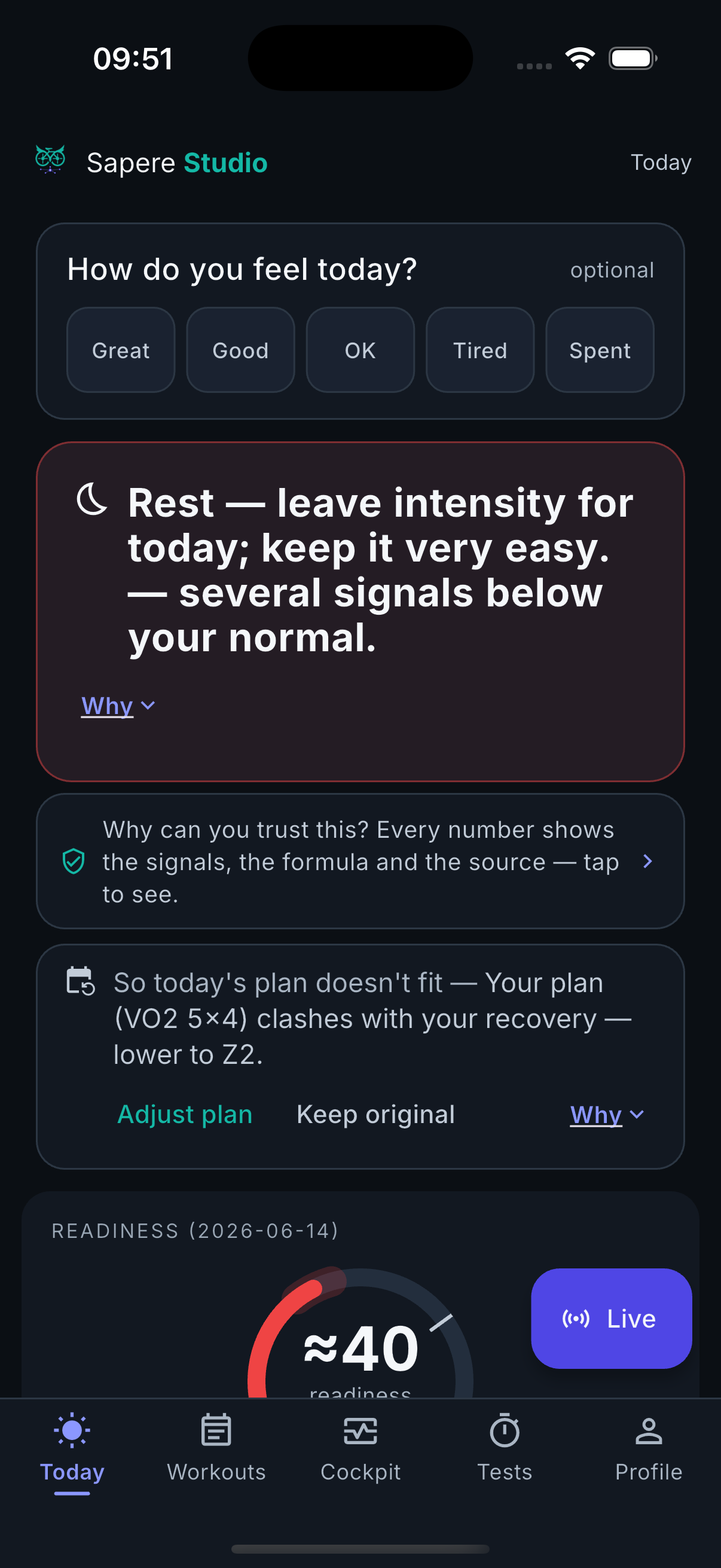
The answer is the first thing you see; the depth is one tap under it.
Go, ease, or rest — with a clear effort ceiling for the day, in plain language.
Studio weighs your load and form (fitness, fatigue, form) against your readiness and your own check-in, then answers in words — not just a score. If today’s planned workout clashes with your recovery it suggests an adjustment; you decide.
Sources: Banister (1991) impulse-response · Coggan / TrainingPeaks (CTL·ATL·TSB).How ready your body is to train, from heart-rate variability, resting heart rate and sleep.
Your recovery signals are scored against your own rolling baseline with robust z-scores, so one odd night doesn’t swing the call. HRV is read as a 60-day baseline, smoothed against a 7-day rolling average. Where Watch has captured a fresh beat-to-beat reading, Studio reads rMSSD — the stronger readiness marker; without one it falls back to Apple’s native SDNN.
The score weighs your autonomic signals (HRV, resting heart rate, breathing rate, wrist temperature) most heavily, your sleep, and your own check-in a smaller but real share. It also has a hard ceiling: when resting heart rate, breathing rate or wrist temperature drifts more than two standard deviations from your own baseline, readiness is capped — Studio shows the uncapped number too, and names which signal caused it. Both the cap and your check-in can only ever pull the number down, never up.
HRV method after Shaffer & Ginsberg (2017); baseline reading is ours.Tap any metric for what it means, why it matters now, the reference and the source.
Estimates are labelled “≈”. On a fresh account Studio tells you it is still building your baseline instead of faking precision. The recovery-deviation cue is a non-medical attention signal — it flags when several signals drift off your baseline together, never illness.
See the full honesty page for every model and reference.After a ride, Studio doesn’t stop at a number — it says what it meant, in plain language first.
Above the tiles, Studio writes the finding as a sentence you’d actually say out loud — “a textbook Z2 ride, power close to flat.” Tap through and the same finding appears again for the coach: the exact window it was measured on and the rule of thumb next to it, both drawn from the same list of facts. Readiness and HRV findings stay strictly descriptive — no rule of thumb is ever attached to your recovery.
See it on a real ride → How it works.A live second screen on your phone while you ride (with the Edge fields), plus sleep, body and form trends that never exaggerate.
While you ride, Studio mirrors your block, target vs actual power, elapsed and remaining, NP/TSS/kJ on a second screen. The cockpit shows your trends honestly — a zoomed axis is marked, and a thin series says so.
The Garmin data fields are coming; the live screen pairs with them.Watch ships with Studio on your Apple Watch — a native companion, not a separate install.
Apple only exposes SDNN from your wrist. Watch reads the raw beat-to-beat heartbeat series itself and computes rMSSD — the stronger readiness marker.
watchOS won’t let an app start its own recording session, so Watch waits for you to run Apple’s own Breathe / Mindfulness session, then reads the beat-to-beat series that session writes to Health and computes rMSSD from it. A fresh series has to end after the measurement started and begin within seconds of it — an old or unrelated series is never used. If no fresh series is there, Watch falls back to a fresh SDNN reading instead, marked ≈ — never shown as if it were rMSSD.
rMSSD from beat-to-beat intervals; Shaffer & Ginsberg (2017).An optional, once-a-day autonomous night reading — off until you turn it on.
Once enabled, Watch reads the beat-to-beat series it already recorded overnight (22:00–10:00) and sends the median rMSSD of the valid ones as a ≈ night value — but only when there are at least three good readings spanning two hours or more of the night. Too little data and it sends nothing, rather than a value built on scraps. A measurement you take yourself always wins over the automatic one.
Your readiness ring, your recovery trajectory, today’s session and more — right on the watch face.
Nine complications live there: your readiness ring; a recovery-trajectory arrow showing whether recovery is trending up, flat, or piling fatigue; a one-tap HRV measurement; today’s planned session; your fitness (CTL) and form (TSB) numbers; a one-tap breathing session; a one-tap cold-immersion log; a wake card showing whether you’ve taken this morning’s reading yet; and an HRV-versus-your-baseline word. On watchOS 26, a Control takes you straight into a measurement from Control Center or the action button — no hunting for the app first.
A stale reading is always shown as stale — never a frozen number passed off as fresh.Watch is in testing like the rest of Studio — worn on a real Apple Watch, not yet in the App Store.
Studio works either way — it just shows the honest fallback when a number can’t be computed.
Your watt-based numbers fill in: form, efficiency context and the power-duration profile. The rider-type radar sharpens as you test.
Readiness, sleep, body and the daily decision all still work. The watt-only numbers stay blank rather than guessing — honest over fake precision.
A non-medical attention signal. When several recovery signals drift off your own baseline together for two or more days, Studio flags that something is off and suggests an easier day. It does not detect, diagnose or predict illness. Wrist temperature is read as a deviation from your baseline, never as a fever or temperature reading.
Sapere is not a medical device and does not provide medical advice. More on the science →
iOS, with Watch built in. Built solo by a cyclist; free to start.
An intervals.icu account (sign-in or an API key you provide). Apple Watch is optional — Studio works fully on the phone alone; Health data stays read-only, processed on your device.
English, Dutch, German, French, Italian and Spanish — labels switch with your device language; units and metric abbreviations stay neutral.
Every part feeds one honest daily answer. Explore the family →
Sapere is a training & wellness tool — not a medical device. It does not diagnose, treat or predict illness, and does not give medical advice.